

本教程解决什么问题?
本文演示从服装图片提取到人物虚拟试衣的完整流程,并重点说明 QwenImageEditPlusPipeline 的初始化、LoRA 权重加载和生成参数。遇到 load_lora_weights、weight_names 或 adapter_names 相关报错时,应先核对当前 Diffusers 版本的函数签名、权重文件名和适配器名称是否一致。
图像编辑模型的能力不容低估。它们可以轻松地对现有图像进行各种修改,应用场景极其广泛:
例如为艺术家和设计师提升照片质量、生成营销素材、制作游戏资源等。更进一步的是,这些模型还可以结合 AI 能力,实现诸如“风格迁移(Style Transfer)”等高级效果。
在我们评测图像编辑模型的过程中,这些模型的高效与易用性给我们留下了深刻印象,因此我们希望构建一个实用示例,展示它们如何应用于真实世界场景。
本文将介绍如何基于 Qwen Image Edit 2509 模型开发一个「虚拟试衣(Try On Clothes)应用」。 该应用通过两条不同的处理路径(pipeline)来使用两种 Qwen Image Edit 2509 的 LoRA 模型:
- 第一步:从输入的人像中提取服装,生成一套置于白色背景上的衣物图像;
- 第二步:将这套衣物叠加到选定的目标人物上。
这两个步骤结合起来,构成了一种高效、简便的方式,用于快速预览不同人物穿上同一套衣服后的效果。
关键要点
- 利用 Qwen Image Edit 2509 + LoRA 模型,可以打造功能强大的虚拟试衣应用;
- 在 DigitalOcean GPU Droplet 上部署运行非常简单;
- 该应用现已上线 Hugging Face,其中的模型可分别用于 提取服装 和 试穿服装。
虚拟试衣 Web 应用介绍
我们先来分解一下整个 Web 应用的结构。
在下面的应用代码中,我们添加了注释,帮助你理解其主要内容与逻辑。
## Load in the packages

import spaces
import torch
from PIL import Image
from diffusers import QwenImageEditPlusPipeline
from diffusers.utils import load_image
import gradio as gr

## Instantiate the model

pipe = QwenImageEditPlusPipeline.from_pretrained(
    "Qwen/Qwen-Image-Edit-2509", torch_dtype=torch.bfloat16
    ).to("cuda")

## Extract clothes function: first load the lora weights into the pipeline, then load the image, and then run the pipeline. Then remove the weights from the pipeline, and return the image

@spaces.GPU()
def extract_clothes(img1):
    pipe.load_lora_weights("JamesDigitalOcean/Qwen_Image_Edit_Extract_Clothing", weight_names = "qwen_image_edit_remove_body.safetensors", adapter_names = "removebody")
    pil_image = Image.fromarray(img1, 'RGB')
    # image_1 = load_image(img1)
    # print(type(image_1))
    image = pipe(
        image=[pil_image],
        prompt="removebody remove the person from this image, but leave the outfit. the clothes should remain after deleting the person's body, skin, and hair. leave the clothes in front of a white background",
        num_inference_steps=50
    ).images[0]
    pipe.delete_adapters("removebody")
    return image

## tryon_clothes function: first load the lora weights into the pipeline, then load the two images, and then run the pipeline. Then remove the weights from the pipeline, and return the image.

@spaces.GPU()
def tryon_clothes(img2, img3):
    pipe.load_lora_weights("JamesDigitalOcean/Qwen_Image_Edit_Try_On_Clothes", weight_names = "qwen_image_edit_tryon.safetensors", adapter_names = "tryonclothes")
    pil_image2 = Image.fromarray(img2, 'RGB')
    pil_image3 = Image.fromarray(img3, 'RGB')
    image = pipe(
    image=[pil_image2, pil_image3],
    prompt="tryon_clothes dress the clothing onto the person",
    num_inference_steps=50
    ).images[0]
    pipe.delete_adapters("tryonclothes")
    return image

## Gradio application code

with gr.Blocks() as demo:
    gr.Markdown("<div style='display:flex;justify-content:center;align-items:center;gap:.5rem;font-size:24px;'>👔 <strong>Qwen Image Edit Clothing Try On</strong> 👔</div>")
    with gr.Column():
        with gr.Row():
            img1 = gr.Image(label = 'Upload Clothing Image')
            img2 = gr.Image(label = 'Extracted Clothing')
            img3 = gr.Image(label = 'Upload Model Photo')
            img4 = gr.Image(label = 'Put The Clothing onto Model')

    with gr.Column():
        with gr.Row():
            remove_button = gr.Button('Extract Clothing')
            tryon_button = gr.Button('Put Clothing on Model')
    gr.on(
        triggers=[remove_button.click],
        fn=extract_clothes,
        inputs=[img1],
        outputs=[img2],
    )
    gr.on(
        triggers=[tryon_button.click],
        fn=tryon_clothes,
        inputs=[img2, img3],
        outputs=[img4],
    )
if __name__ == "__main__":
    demo.launch(share=True)
正如我们所看到的,这个应用的代码相当简洁。它主要由两个函数组成: 一个用于通过 Diffusers 加载模型及其对应的 LoRA,另一个用于运行服装提取或虚拟试衣流程。前者在单张图像上进行服装提取,后者使用两张图像完成服装试穿。最终,程序会生成一张 .webp 格式的输出图像,可直接预览或下载。
在这个过程中,真正承担主要计算任务的是 低秩适配模型(LoRA, Low Rank Adaptation) 。 每个 LoRA 模型都在 DigitalOcean GPU Droplet 云服务器上使用 NVIDIA H200 进行训练,训练集包含 20 张图片,批大小为 4,总共训练 3,000 步。模型的训练采用了 Ostris 的 AI-Toolkit 工具包。
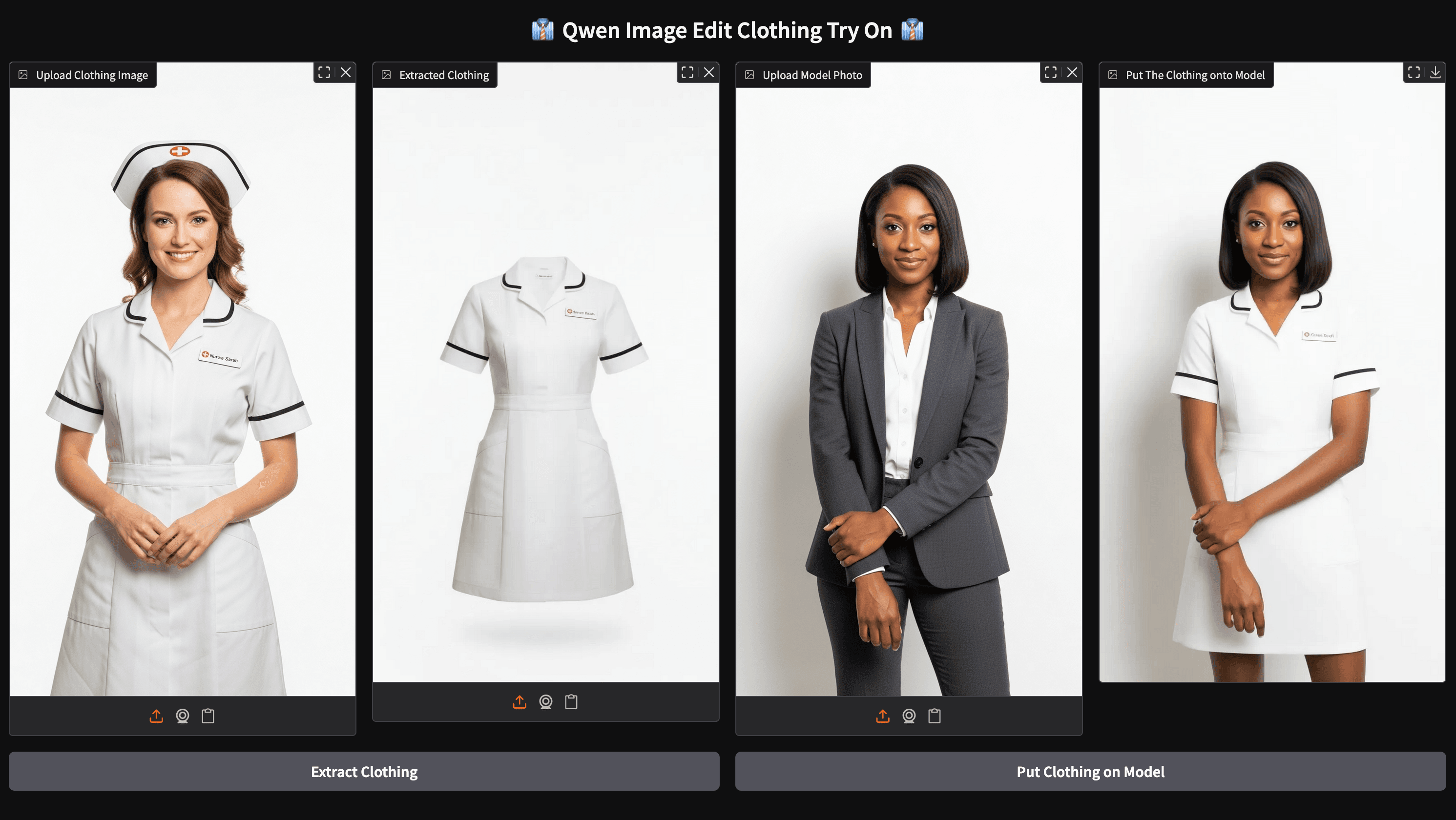
将这些步骤整合在一起,就形成了上图所示的 Web 应用。
上方示例展示了该应用从“服装提取”到“试穿展示”的完整流程:模型先从原图中提取出衣物并放置在白色背景上,然后将提取出的服装叠加到目标人物身上。
运行虚拟试衣应用
要开始使用 Clothing Try On Application(虚拟试衣应用) ,首先需要确保具备足够的算力。 我们推荐在 DigitalOcean 的 Gradient 平台 上使用 NVIDIA H100 GPU Droplet, 其性能可靠,计费相对于其它云平台都要经济实惠,并且开启一台按需实例只需要鼠标点击下。
开始前,请登录你的 DigitalOcean 账户,并创建一个 GPU Droplet。关于如何逐步配置 GPU Droplet,你可以参考我们在卓普云官网aidroplet.com上发布的往期文章。
当 GPU Droplet 启动完成后,就可以配置运行环境了:
- 从 Hugging Face 克隆该项目的仓库到本地;
- 创建一个虚拟环境用于安装依赖包,并激活它;
- 安装所需的依赖包。
你可以使用以下命令片段来完成这些步骤。
git clone https://huggingface.co/spaces/JamesDigitalOcean/Qwen_Image_Edit_Try_On_Clothes
cd Qwen_Image_Edit_Try_On_Clothes/
python3 -m venv venv
source venv/bin/activate
pip3 install -r requirements.txt
完成以上步骤后,就可以运行这个 Web 应用了。
只需将以下代码粘贴到终端中运行,然后点击生成的公开链接,就能在任意浏览器中打开并访问该应用。
python app.py
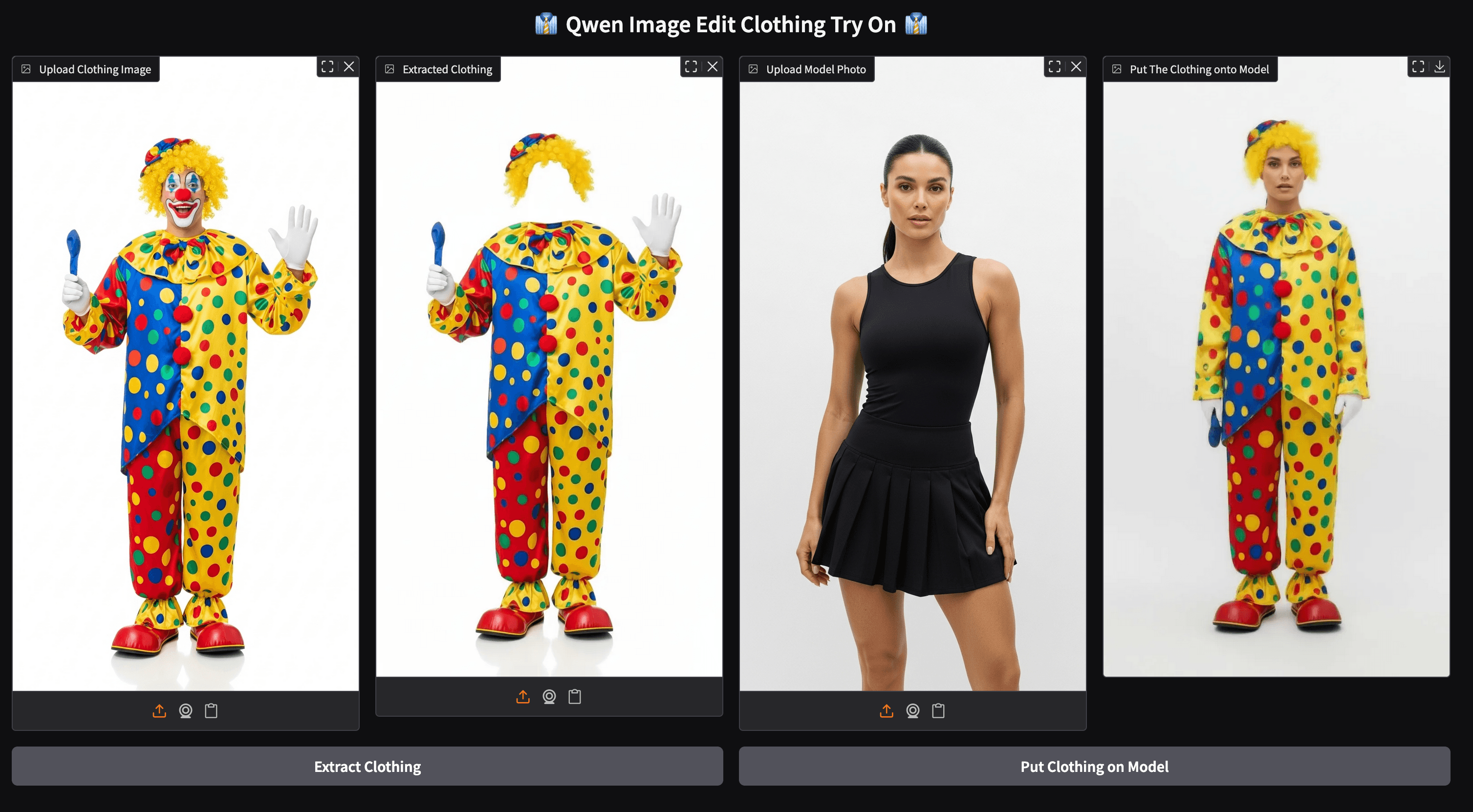
这是另一个示例运行结果。可以看到,该模型在两个阶段——服装提取和虚拟试穿——的表现都十分出色。 我们也建议你尝试使用自己的照片,看看不同服装在你身上的效果!
总结
这款 Web 应用的诞生,灵感来自 Hugging Face 上 Kolors 虚拟试衣应用 的长期成功。 我们的目标是在此基础上,利用更先进的模型进行改进,并确保这类技术能够开放、可访问、人人可用。
Qwen Image Edit 2509 是一款极其强大的图像编辑模型,即便不搭配 LoRA,其表现也令人印象深刻。 不过,LoRA 模型依然是整个流程中不可或缺的关键部分,也是本项目的核心创新点。
相应的模型文件可在以下位置获取:
- 服装提取模型 LoRA:https://huggingface.co/JamesDigitalOcean/Qwen_Image_Edit_Extract_Clothing
- 虚拟试穿模型 LoRA:https://huggingface.co/JamesDigitalOcean/Qwen_Image_Edit_Try_On_Clothes
DigitalOcean 除了H200、H100,还有包括AMD MI325x、MI300x,RTX 6000 Ada、 L40S等型号的 GPU云服务器,既有按需实例,也有裸金属服务器。如果需要了解详细配置,或需要预定大量库存、获取最新优惠政策,可直接联系 DigitalOcean 中国区独家战略合作伙伴卓普云aidroplet.com。
Qwen Image Edit 虚拟试衣 FAQ
load_lora_weights 为什么会报参数错误?
不同 Diffusers 或模型实现的参数名可能不同。先确认安装版本与示例代码一致,再检查权重文件路径、weight_names 与 adapter_names 是否对应;不要直接混用其他 Qwen Image 版本的加载代码。
虚拟试衣需要什么 GPU?
显存需求取决于图片分辨率、推理步数、精度和是否同时加载多个 LoRA。建议先用较低分辨率验证流程,再逐步提高画质。需要云端 GPU 时,可参考 DigitalOcean GPU 云服务器选型。
相关产品与选型